今天就跟大家聊聊有关如何在Spring中使用Security实现单点登录,可能很多人都不太了解,为了让大家更加了解,小编给大家总结了以下内容,希望大家根据这篇文章可以有所收获。
关键依赖
<parent>
    <groupId>org.springframework.boot</groupId>
    <artifactId>spring-boot-starter-parent</artifactId>
    <version>2.1.2.RELEASE</version>
    <relativePath/>
</parent>

<dependencies>
    <dependency>
      <groupId>org.springframework.boot</groupId>
      <artifactId>spring-boot-starter-security</artifactId>
    </dependency>
    <dependency>
      <groupId>org.springframework.boot</groupId>
      <artifactId>spring-boot-starter-web</artifactId>
    </dependency>

    <dependency>
      <groupId>org.springframework.boot</groupId>
      <artifactId>spring-boot-starter-test</artifactId>
      <scope>test</scope>
    </dependency>
    <dependency>
      <groupId>org.springframework.security</groupId>
      <artifactId>spring-security-test</artifactId>
      <scope>test</scope>
    </dependency>
    <dependency>
      <groupId>org.springframework.security.oauth.boot</groupId>
      <artifactId>spring-security-oauth3-autoconfigure</artifactId>
      <version>2.1.2.RELEASE</version>
    </dependency>
</dependencies>
认证服务器
认证服务器的关键代码有如下几个文件:
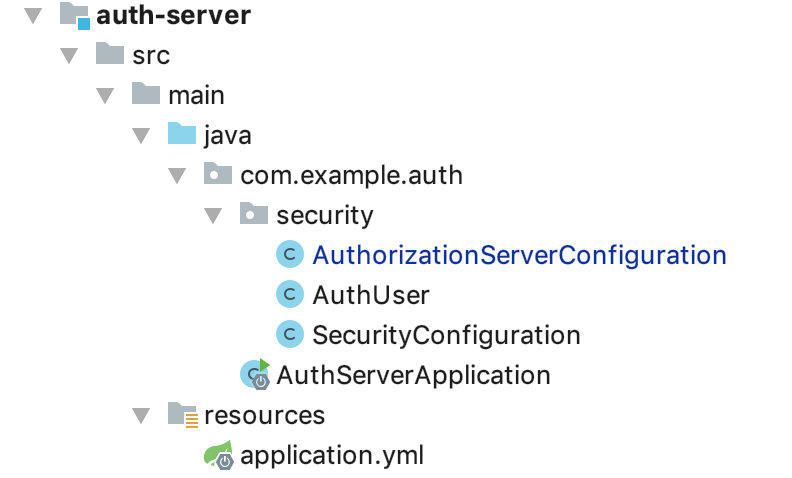
AuthServerApplication:
@SpringBootApplication
@EnableResourceServer
public class AuthServerApplication {
  public static void main(String[] args) {
    SpringApplication.run(AuthServerApplication.class, args);
  }

}
AuthorizationServerConfiguration 认证配置:
@Configuration
@EnableAuthorizationServer
class AuthorizationServerConfiguration extends AuthorizationServerConfigurerAdapter {
  @Autowired
  AuthenticationManager authenticationManager;

  @Autowired
  TokenStore tokenStore;

  @Autowired
  BCryptPasswordEncoder encoder;

  @Override
  public void configure(ClientDetailsServiceConfigurer clients) throws Exception {
    //配置客户端
    clients
        .inMemory()
        .withClient("client")
        .secret(encoder.encode("123456")).resourceIds("hi")
        .authorizedGrantTypes("password","refresh_token")
        .scopes("read");
  }

  @Override
  public void configure(AuthorizationServerEndpointsConfigurer endpoints) throws Exception {
    endpoints
        .tokenStore(tokenStore)
        .authenticationManager(authenticationManager);
  }


  @Override
  public void configure(AuthorizationServerSecurityConfigurer oauthServer) throws Exception {
    //允许表单认证
    oauthServer
        .allowFormAuthenticationForClients()
        .checkTokenAccess("permitAll()")
        .tokenKeyAccess("permitAll()");
  }
}
代码中配置了一个 client,id 是 client,密码 123456。 authorizedGrantTypes 有 password 和refresh_token 两种方式。
SecurityConfiguration 安全配置:
@Configuration
@EnableWebSecurity
public class SecurityConfiguration extends WebSecurityConfigurerAdapter {
  @Bean
  public TokenStore tokenStore() {
    return new InMemoryTokenStore();
  }

  @Bean
  public BCryptPasswordEncoder encoder() {
    return new BCryptPasswordEncoder();
  }

  @Override
  protected void configure(AuthenticationManagerBuilder auth) throws Exception {
    auth.inMemoryAuthentication()
        .passwordEncoder(encoder())
        .withUser("user_1").password(encoder().encode("123456")).roles("USER")
        .and()
        .withUser("user_2").password(encoder().encode("123456")).roles("ADMIN");
  }

  @Override
  protected void configure(HttpSecurity http) throws Exception {
    // @formatter:off
    http.csrf().disable()
        .requestMatchers()
        .antMatchers("/oauth/authorize")
        .and()
        .authorizeRequests()
        .anyRequest().authenticated()
        .and()
        .formLogin().permitAll();
    // @formatter:on
  }

  @Override
  @Bean
  public AuthenticationManager authenticationManagerBean() throws Exception {
    return super.authenticationManagerBean();
  }
}
上面在内存中创建了两个用户,角色分别是 USER 和 ADMIN。后续可考虑在数据库或者 Redis 中存储相关信息。
AuthUser 配置获取用户信息的 Controller:
@RestController
public class AuthUser {
    @GetMapping("/oauth/user")
    public Principal user(Principal principal) {
      return principal;
    }

}
application.yml 配置,主要就是配置个端口号:
---
spring:
 profiles:
  active: dev
 application:
  name: auth-server
server:
 port: 8101
客户端配置
客户端的配置比较简单,主要代码结构如下:

application.yml 配置:
---
spring:
 profiles:
  active: dev
 application:
  name: client

server:
 port: 8102
security:
 oauth3:
  client:
   client-id: client
   client-secret: 123456
   access-token-uri: http://localhost:8101/oauth/token
   user-authorization-uri: http://localhost:8101/oauth/authorize
   scope: read
   use-current-uri: false
  resource:
   user-info-uri: http://localhost:8101/oauth/user
这里主要是配置了认证服务器的相关地址以及客户端的 id 和 密码。user-info-uri 配置的就是服务器端获取用户信息的接口。
HelloController 访问的资源,配置了 ADMIN 的角色才可以访问:
@RestController
public class HelloController {
  @RequestMapping("/hi")
  @PreAuthorize("hasRole('ADMIN')")
  public ResponseEntity<String> hi() {
    return ResponseEntity.ok().body("auth success!");
  }
}
WebSecurityConfiguration 相关安全配置:
@Configuration
@EnableOAuth3Sso
@EnableGlobalMethodSecurity(prePostEnabled = true)
class WebSecurityConfiguration extends WebSecurityConfigurerAdapter {

  @Override
  public void configure(HttpSecurity http) throws Exception {

    http
        .csrf().disable()
        // 基于token,所以不需要session
       .sessionManagement().sessionCreationPolicy(SessionCreationPolicy.STATELESS)
        .and()
        .authorizeRequests()
        .anyRequest().authenticated();
  }


}
其中 @EnableGlobalMethodSecurity(prePostEnabled = true) 开启后,Spring Security 的 @PreAuthorize,@PostAuthorize 注解才可以使用。
@EnableOAuth3Sso 配置了单点登录。
ClientApplication:
@SpringBootApplication
@EnableResourceServer
public class ClientApplication {
  public static void main(String[] args) {
    SpringApplication.run(ClientApplication.class, args);
  }

}
验证
启动项目后,我们使用 postman 来进行验证。
首先是获取 token:
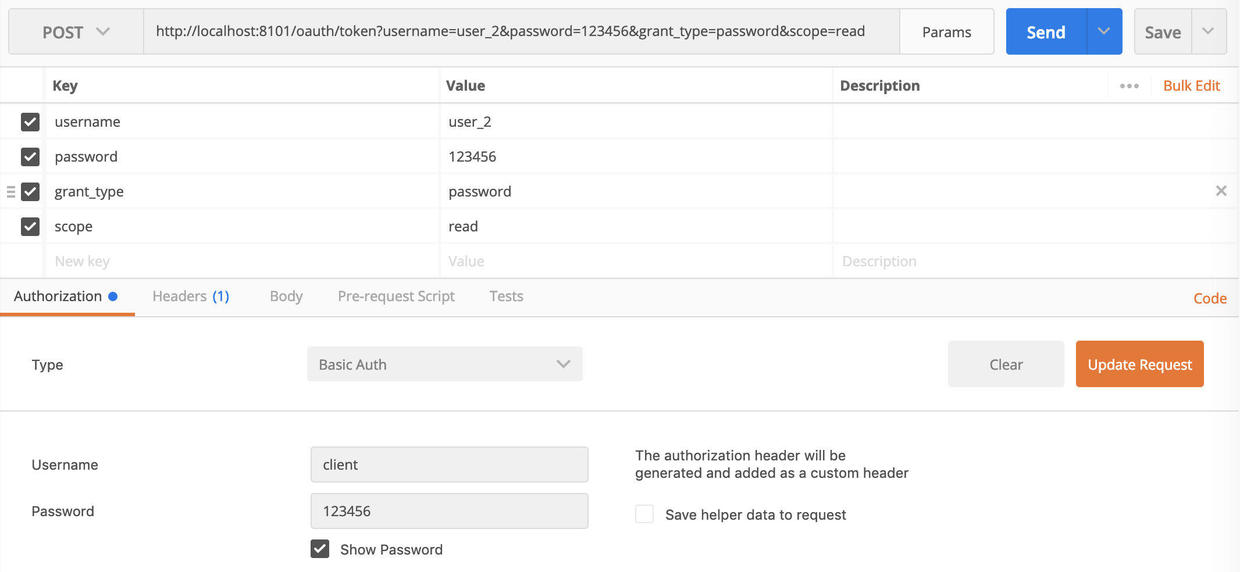
选择 POST 提交,地址为验证服务器的地址,参数中输入 username,password,grant_type 和 scope ,其中 grant_type 需要输入 password。
然后在下面等 Authorization 标签页中,选择 Basic Auth,然后输入 client 的 id 和 password。
{
  "access_token": "02f501a9-c482-46d4-a455-bf79a0e0e728",
  "token_type": "bearer",
  "refresh_token": "0e62dddc-4f51-4cb5-81c3-5383fddbb81b",
  "expires_in": 41741,
  "scope": "read"
}
此时就可以获得 access_token 为: 02f501a9-c482-46d4-a455-bf79a0e0e728。需要注意的是这里是用 user_2 获取的 token,即角色是 ADMIN。
然后我们再进行获取资源的验证:

使用 GET 方法,参数中输入 access_token,值输入 02f501a9-c482-46d4-a455-bf79a0e0e728 。
点击提交后即可获取到结果。
看完上述内容,你们对如何在Spring中使用Security实现单点登录有进一步的了解吗?如果还想了解更多知识或者相关内容,请关注亿速云行业资讯频道,感谢大家的支持。
免责声明:本站发布的内容(图片、视频和文字)以原创、转载和分享为主,文章观点不代表本网站立场,如果涉及侵权请联系站长邮箱:is@yisu.com进行举报,并提供相关证据,一经查实,将立刻删除涉嫌侵权内容。







