这期内容当中小编将会给大家带来有关使用springboot如何实现一个短信验证码登录功能,文章内容丰富且以专业的角度为大家分析和叙述,阅读完这篇文章希望大家可以有所收获。
1 、构造手机验证码:使用 random 对象生成要求的随机数作为验证码,例如 4 位验证码: 1000~9999 之间随机数;
2 、使用接口向短信平台发送手机号和验证码数据,然后短信平台再把验证码发送到制定手机号上,接口参数一般包括:目标手机号,随机验证码 (或包含失效时间),平台接口地址,平台口令;
3 、保存接口返回的信息(一般为 json 文本数据,然后需转换为 json 对象格式);
4 、将手机号 — 验证码、操作时间存入 Session 中,作为后面验证使用;
5 、接收用户填写的验证码及其他数据;
6 、对比提交的验证码与 Session 中的验证码是否一致,同时判断提交动作是否在有效期内;
7 、验证码正确且在有效期内,请求通过,处理相应的业务。
<!--秒滴云的jar包-->
<dependency>
 <groupId>commons-codec</groupId>
 <artifactId>commons-codec</artifactId>
 <version>1.11</version>
</dependency>
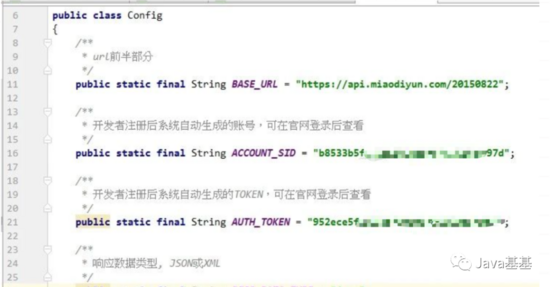
等等需要去秒滴云官方下载文档,下面是编写的一个 config 文档,专门存放一些参数
public class HttpUtil
{
 /**
 * 构造通用参数timestamp、sig和respDataType
 *
 * @return
 */
 public static String createCommonParam()
 {
  // 时间戳
  SimpleDateFormat sdf = new SimpleDateFormat("yyyyMMddHHmmss");
  String timestamp = sdf.format(new Date());


  // 签名
  String sig = DigestUtils.md5Hex(Config.ACCOUNT_SID + Config.AUTH_TOKEN + timestamp);


  return "×tamp=" + timestamp + "&sig=" + sig + "&respDataType=" + Config.RESP_DATA_TYPE;
 }


 /**
 * post请求
 *
 * @param url
 * 功能和操作
 * @param body
 * 要post的数据
 * @return
 * @throws IOException
 */
 public static String post(String url, String body)
 {
  System.out.println("url:" + System.lineSeparator() + url);
  System.out.println("body:" + System.lineSeparator() + body);


  String result = "";
  try
  {
   OutputStreamWriter out = null;
   BufferedReader in = null;
   URL realUrl = new URL(url);
   URLConnection conn = realUrl.openConnection();


   // 设置连接参数
   conn.setDoOutput(true);
   conn.setDoInput(true);
   conn.setConnectTimeout(5000);
   conn.setReadTimeout(20000);
   conn.setRequestProperty("Content-Type", "application/x-www-form-urlencoded");
   // 提交数据
   out = new OutputStreamWriter(conn.getOutputStream(), "UTF-8");
   out.write(body);
   out.flush();


   // 读取返回数据
   in = new BufferedReader(new InputStreamReader(conn.getInputStream(), "UTF-8"));
   String line = "";
   boolean firstLine = true; // 读第一行不加换行符
   while ((line = in.readLine()) != null)
   {
   if (firstLine)
   {
    firstLine = false;
   } else
   {
    result += System.lineSeparator();
   }
   result += line;
   }
  } catch (Exception e)
  {
   e.printStackTrace();
  }
  return result;
 }


 /**
 * 回调测试工具方法
 *
 * @param url
 * @param reqStr
 * @return
 */
 public static String postHuiDiao(String url, String body)
 {
  String result = "";
  try
  {
   OutputStreamWriter out = null;
   BufferedReader in = null;
   URL realUrl = new URL(url);
   URLConnection conn = realUrl.openConnection();


   // 设置连接参数
   conn.setDoOutput(true);
   conn.setDoInput(true);
   conn.setConnectTimeout(5000);
   conn.setReadTimeout(20000);


   // 提交数据
   out = new OutputStreamWriter(conn.getOutputStream(), "UTF-8");
   out.write(body);
   out.flush();


   // 读取返回数据
   in = new BufferedReader(new InputStreamReader(conn.getInputStream(), "UTF-8"));
   String line = "";
   boolean firstLine = true; // 读第一行不加换行符
   while ((line = in.readLine()) != null)
   {
   if (firstLine)
   {
    firstLine = false;
   } else
   {
    result += System.lineSeparator();
   }
   result += line;
   }
  } catch (Exception e)
  {
   e.printStackTrace();
  }
  return result;
 }
}public static String runNumber() {
String str="ABCDEFGHIJKLMNOPQRSTUVWXYZ0123456789";
StringBuilder sb=new StringBuilder(4);
for(int i=0;i<4;i++)
{
char ch=str.charAt(new Random().nextInt(str.length()));
sb.append(ch);
}
System.out.println(sb.toString());
String code = sb.toString();
return code;
}执行方法 execute(),便会发送成功
public class IndustrySMS
{
 private static String operation = "/industrySMS/sendSMS";


 private static String accountSid = Config.ACCOUNT_SID;
 private static String to = "15342349382";
 private static String smsContent = "【小陶科技】登录验证码:{"+runNumber().toString()+"},如非本人操作,请忽略此短信。";


 /**
 * 验证码通知短信
 */
 public static void execute()
 {
  String tmpSmsContent = null;
  try{
   tmpSmsContent = URLEncoder.encode(smsContent, "UTF-8");
  }catch(Exception e){
  }
  String url = Config.BASE_URL + operation;
  String body = "accountSid=" + accountSid + "&to=" + to + "&smsContent=" + tmpSmsContent
   + HttpUtil.createCommonParam();


  // 提交请求
  String result = HttpUtil.post(url, body);
  System.out.println("result:" + System.lineSeparator() + result);
}
上述就是小编为大家分享的使用springboot如何实现一个短信验证码登录功能了,如果刚好有类似的疑惑,不妨参照上述分析进行理解。如果想知道更多相关知识,欢迎关注亿速云行业资讯频道。
免责声明:本站发布的内容(图片、视频和文字)以原创、转载和分享为主,文章观点不代表本网站立场,如果涉及侵权请联系站长邮箱:is@yisu.com进行举报,并提供相关证据,一经查实,将立刻删除涉嫌侵权内容。







